Android · Works with the Uber & Lyft driver apps

See what a ride really pays.
Before you accept.

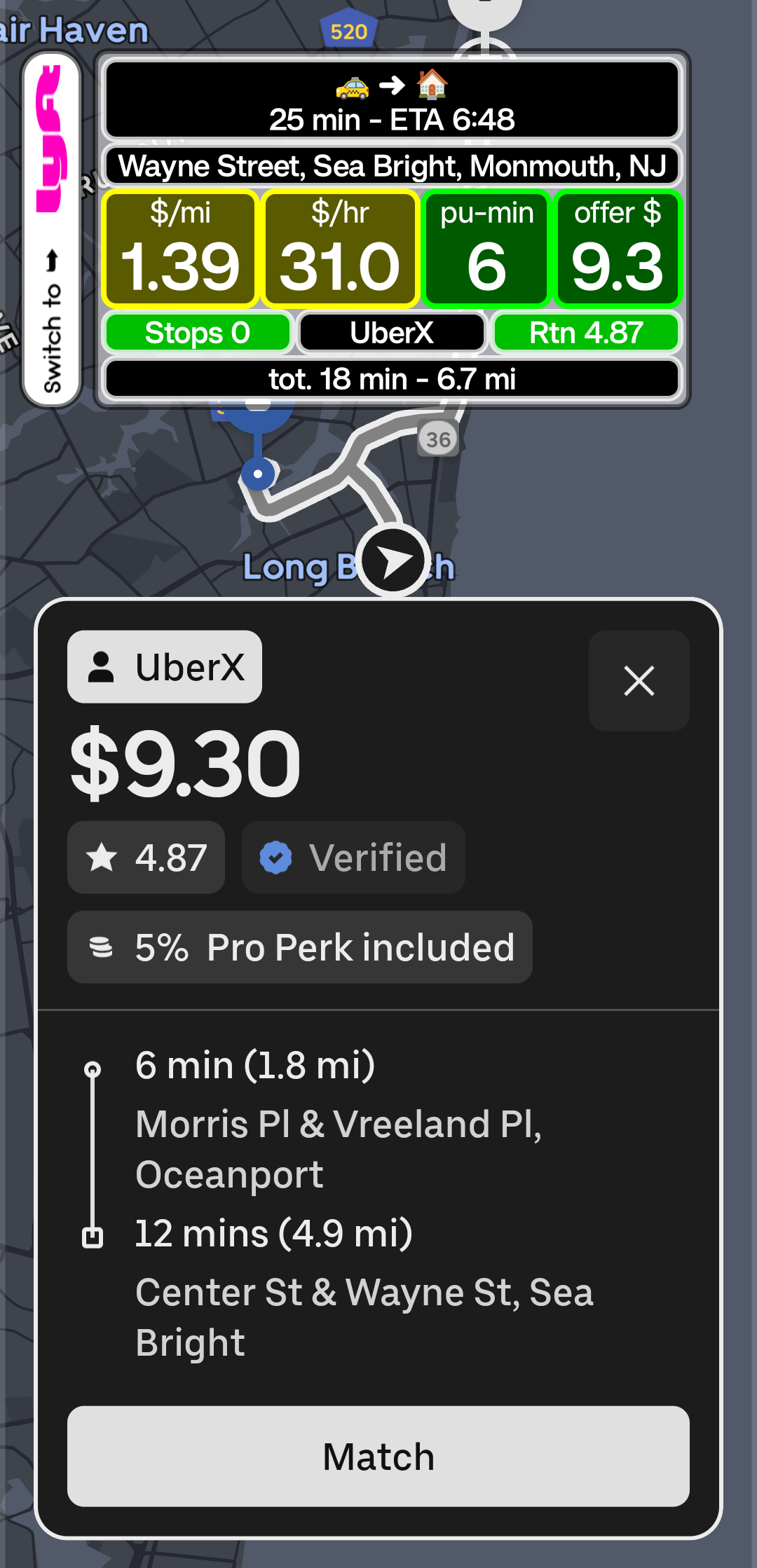
CherrySpotter reads the offer on your screen and puts what matters on one card: dollars per mile, dollars per hour, pickup minutes and where the trip ends, colored by limits you set. One glance. Your decision.

Coming soon See the Cherry card

$2.99 per month after a 14-day free trial that needs no credit card. Cancel any time. Refund policy

The Cherry card of CherrySpotter showing dollars per mile, dollars per hour, pickup minutes and the offer amount on top of a rideshare offer
100% manual controlYou accept or decline every trip
No auto-acceptingNo bots, no automation
Stays on your phoneOffers and screenshots are never uploaded
Never touches Uber or LyftIt reads the screen, nothing more

What it does for you

Nine things you stop guessing

Every one of them lives on the Cherry card or one tap away in Preferences. The names below are the ones the app uses.

Know if it pays in one second

Dollars per mile and dollars per hour appear the instant the offer does, green, yellow or red by the Pay limits you set. No mental math at a red light.

In the app: Preferences › Pay limits

Stop driving for free

Switch on the Realistic offer and the card takes your own cost per mile off every ride before it shows the numbers.

What the ride app shows$6.00 for 12 mi
$0.50/mi · $22.5/hr
Really, at 25¢ a mile$3.00 left
$0.25/mi · $11.2/hr

In the app: Preferences › Realistic offer

Catch the long pickup before it catches you

Set the longest pickup you accept, your minimum fare and your minimum rider rating. Any offer below your line turns that box red.

In the app: Preferences › Offer limits

Know where a trip leaves you Our own address server

The ride apps show a street and a city. The card adds the county and state, found by our own address server in about a tenth of a second, and turns the Drop-off box red for your Places to avoid or green for your Preferred places.

In the app: Preferences › Drop-off places

Point your night home Beta

Pick Home, Work or a new destination. When an offer heads that way the card says so, with the drive time and your arrival time. Long shifts end where you want them to.

In the app: Cherry Card Preferences › Direction & ETA settings

See every detail that changes the ride

Stops, service type and the rider’s rating, plus the miles and minutes of the whole trip with the pickup included. Nothing hidden behind a tap.

On the card: Offer details and Trip totals

Your card, your layout

Two layout modes. In Detailed mode keep the rows you want and pick three-quarter or full width. In Focus mode the four numbers stack in a card whose height you set with a slider; the numbers and the width follow. Drag the card where it bothers nothing, and switch between Uber and Lyft from the bar above the card.

In the app: Cherry Card Preferences

Keep the proof Optional

Save a screenshot of every offer on your phone and browse them under Screenshots. Off until you switch it on, and nothing is uploaded.

In the app: Preferences › Screenshots

English or Spanish, one tap

The whole app speaks both. Switch with the language button on the main screen; the website and the policies are in both languages too.

In the app: the language button on the main screen

Did you know?

Every mile costs money

Fuel, upkeep and wear. If you do not count them, a trip can pay less than it looks. That is what the Realistic offer is for. These ranges are only examples; your costs depend on your car, fuel prices and how you drive.

$0.15 – $0.25Fuel per mile
$0.09 – $0.12Maintenance per mile
$0.30 – $0.40Depreciation per mile

Read it in a second

One compact Cherry card, everything that matters

The Cherry card sits on top of the ride app and updates as offers arrive. Every label below is the one on the card.

  • $/miDollars per mile for the whole trip, including the drive to the pickup.
  • $/hrDollars per hour based on total trip time.
  • pickupPickup minutes (the small “min” sits next to the number), so you know how far you drive before the rider is in the car.
  • offer $The offer amount from the ride app.
  • Rtg.Offer details: the rider’s rating, the number of stops and the service type.
  • tot.Trip totals: the miles and minutes of the whole trip.
  • drop-offThe Drop-off box: where the trip ends, as road, city, county and state. Red for your Places to avoid, green for your Preferred places.
  • ETADirection & ETA: whether the trip takes you toward Home, Work or a destination you set, with the drive time and your arrival time. (Beta)
  • REALISTICThe Realistic offer, if you switch it on: the card takes your own cost per mile off every offer, so the numbers show what you really make.

An example card with the Realistic offer off. Yellow means between your two limits, green means above the one you set as good.

How it works

Set it up once, then just drive

The setup guide in the app walks you through each Android permission and says exactly why it is needed.

Install and set up

Follow the setup guide to allow the few Android permissions the app needs. It takes a couple of minutes, and you can reopen the guide any time.

Open Uber or Lyft

CherrySpotter sleeps to save battery and wakes up only when a driver app is on screen.

Decide with confidence

The Cherry card appears with the numbers. You accept, decline or skip in the ride app, as always.

Updates itself: tap Check for updates in the app Android 11 or newer, phones and tablets No license key, ever: your Google account is your license

What it never does

Built to stay out of your way

Four promises, written into the app and into our Terms of Service.

Never accepts or declines for you

No bots, no automation. Every decision is yours, made in the ride app.

Never asks for your Uber or Lyft login

You sign in only to CherrySpotter, with Google, for your license.

Never changes the ride apps

It reads the offer on your screen and draws the card on top. Nothing else.

Never uploads your offers or screenshots

They stay on your phone. No ads, no data sales, no keystroke tracking. See exactly what in the privacy policy.

Your eyes belong on the road. The card is made for a one-second glance, but it does not make using a phone while driving safe or legal. Follow local laws and use your phone only when it is safe and legal to do so.

Simple pricing

$2.99 a month. Try it free for 14 days.

  • No credit card for the free trial. It starts inside the app with your Google account.
  • Cancel any time from Manage Subscription in the app. A paid month keeps working until it ends.
  • Not satisfied? A full refund within 7 days of your first payment.
  • One license, one phone at a time. Move it to a new phone by signing out on the old one.
Coming soon

Price in US dollars, plus any tax shown at checkout. Refund and cancellation policy

FAQ

Questions, answered

Does it accept or decline trips for me?

No. There is no auto-accepting and no bot behavior. CherrySpotter only shows information. You make every decision.

Does it need my Uber or Lyft login or access my driver account?

No. CherrySpotter never asks for your Uber or Lyft login or password and does not connect to your driver account. It only reads what is already shown on your screen while the driver app is open, and it never taps, accepts, declines or changes anything in the ride app. You sign in only to CherrySpotter, with your Google account, for your license.

Which platforms and phones does it support?

It works with the Uber and Lyft driver apps on Android phones and tablets, Android 11 or newer. iPhone is not supported.

Why does it need Accessibility and other permissions?

Reading the offer screen, drawing the Cherry card on top of the ride app, and waking up at the right time each need a specific Android permission. The setup guide in the app explains every one and how to allow it.

Can I use it while driving?

The Cherry card is designed for a quick glance so you look at your phone less, but it does not make using a phone while driving safe or legal. You are always responsible for driving safely. Follow local laws and use your phone only when it is safe and legal to do so.

How does the free trial work?

Download the app, open it, sign in with your Google account and tap Start 14-day free trial. A secure Stripe page opens on your phone; no credit card is required for the trial. When you go back to the app it activates by itself. Before the trial ends you can add payment details from Manage Subscription in the app (Stripe may also email you a reminder). After that the subscription costs $2.99 per month (plus any tax shown at checkout), renews monthly, and you can cancel any time from Manage Subscription. If you cancel during the free trial, access ends right away; if you cancel a paid subscription, it keeps working until the end of the period you paid for. If you add nothing, access simply pauses and you can resume later.

How much does it cost, and can I get a refund?

$2.99 per month (USD, plus any sales tax or VAT shown at checkout) after the 14-day free trial, which needs no credit card. You can cancel any time from Manage Subscription in the app and keep access until the end of the period you paid for. If you are not satisfied, email us within 7 days of your first payment for a full refund. The details are in the refund and cancellation policy.

Can the price change?

Possibly in the future, but never without notice. If we change the price, we tell you at least 30 days before it applies to your next renewal (in the app, on this website or by email through Stripe), and you can cancel first. Until then you keep paying the price you agreed to. The full wording is in the Terms of Service.

Who can get a free trial, and why was mine refused?

A free trial is for one person on one phone, so it stays fair for everyone. One unpaid free trial per person at a time: Google accounts and email addresses that reach the same mailbox count as one person (name+promo@gmail.com, na.me@gmail.com and name@gmail.com are the same person). One free trial per phone. Start it from the main profile of your phone, not from Dual Messenger, Secure Folder, a work profile or another user, because each of those looks like a separate phone. And at most 5 new trials a day can start from one Wi-Fi or mobile connection (a shared office or hotspot can reach that; try again tomorrow or on another network).

After your first license has been paid for, you can buy another one (for example for a second phone) and it starts its own free trial. If the app tells you a trial cannot start, it says why and what to do. Anything unclear? Email support@cherrypickerapp.com.

Do I need a license key? How do I sign in?

There are no license keys. Your license belongs to the Google account you sign in with in the app, so there is nothing to copy, lose or type. New phone, reinstalled the app, or cleared its data? Open the app, sign in with the same Google account, and it finds your license by itself. We only receive your Google email address and a unique account ID from Google, never your Google password (see the Privacy Policy).

Can I use my license on a second phone?

One license works on one phone at a time. To move it, open the app on the old phone and tap Sign out (that gives the license back), then sign in on the new phone. A license can be put on up to 3 different phones in 30 days. If you no longer have the old phone, email support@cherrypickerapp.com and we will deactivate it for you. For a second phone at the same time, buy a second license from the app.

What does “beta” mean?

Direction & ETA (the Home, Work or New destination arrow and your arrival time on the Cherry card) is a beta feature. Beta means it is still being tested: it may change, it may be limited or offered only through paid credits (how that would work and what it would cost has not been decided), or it may stop at any time. Whatever happens to it, the core of the app, the Cherry card with your numbers and limits, is not affected. Drop-off places is not beta: it runs on our own address server.

Can Uber or Lyft take action on my account for using it?

CherrySpotter is independent and not affiliated with Uber or Lyft. Platforms set their own rules and can change them, so please review the terms of the platforms you drive for. See our Terms of Service.
Ready to know your numbers?

Download the app and start your 14-day free trial inside it. No credit card required. Then $2.99 per month; cancel any time.

Coming soon